What the Wing Agent Does
The wing agent supports these skills:
generate-cfd-mesh: build the wing CFD mesh and mesh-quality outputs.generate-fea-mesh: build the wingbox FEA mesh for structural workflows.run-aero-simulation: run steady aerodynamic CFD from an existing wing mesh.run-aero-optimization: run aerodynamic shape optimization for the wing.run-aero-struct-simulation: run coupled aero-structural analysis.run-aero-struct-optimization: run coupled aero-structural optimization.
Standard Inputs
airfoil_profiles(list[str], default: [“naca0012”, “naca0012”]): section airfoil profile names ordered root to tip.chords(list[float], default: [1.0, 1.0]): section chord lengths in meters ordered root to tip.spans(list[float], default: [3.0]): span-segment lengths in meters ordered root to tip.sweeps(list[float], default: [0.0]): leading-edge sweep angles in degrees ordered root to tip.dihedrals(list[float], default: [0.0]): dihedral angles in degrees ordered root to tip.twists(list[float], default: [0.0]): twist angles in degrees ordered from the first non-root section to the tip.mesh_cells(int, default: 200000): target total volume mesh cell count.y_plus(float, default: 50.0): target near-wall spacing in wall units (y+) used to estimate the first-layer cell size d0 when it is not provided.mach_number(float, default: 0.2): freestream Mach number used together with y_plus, reynolds_number, and ref_chord to estimate the near-wall first-layer cell size d0 when it is not provided.reynolds_number(float, default: 5e6): freestream Reynolds number used together with y_plus, mach_number, and ref_chord to estimate the near-wall first-layer cell size d0 when it is not provided.local_refine_box(list[list[float]], default: None): optional two-corner local refinement box[[x0, y0, z0], [x1, y1, z1]]; leave unset for no local refinement.
n_ribs(int, default: 10): number of ribs in the spanwise direction.n_spars(int, default: 2): number of spars in the chordwise direction.total_elements_target(int, default: 3000): requested total number of shell elements.wingbox_span(float, default: 0.95): fraction of full wing span covered by the wingbox.wingbox_chord_start(float, default: 0.20): front spar position as a fraction of local chord.wingbox_chord_end(float, default: 0.80): rear spar position as a fraction of local chord.mach_number(float, default: inherited from generate-cfd-mesh): freestream Mach number passed through for downstream coupled skills.reynolds_number(float, default: inherited from generate-cfd-mesh): freestream Reynolds number passed through for downstream coupled skills.airfoil_profiles(list[str], default: inherited from generate-cfd-mesh): section airfoil profiles passed through for downstream coupled skills.chords(list[float], default: inherited from generate-cfd-mesh): section chord lengths passed through for downstream coupled skills.sweeps(list[float], default: inherited from generate-cfd-mesh): section sweep angles passed through for downstream coupled skills.dihedrals(list[float], default: inherited from generate-cfd-mesh): section dihedral angles passed through for downstream coupled skills.spans(list[float], default: inherited from generate-cfd-mesh): section spans passed through for downstream coupled skills.twists(list[float], default: inherited from generate-cfd-mesh): section twists passed through for downstream coupled skills.
angle_of_attack(float, default: 2.0): freestream angle of attack in degrees.fixed_lift_coeff(float, default: -1.0): automatically vary the angle of attack to compute drag at the prescribed lift coefficient. Set it to -1.0 to disable.airfoil_profiles(list[str], default: inherited from generate-cfd-mesh): section airfoil profiles used for CST fitting when needed.mach_number(float, default: inherited from generate-cfd-mesh): freestream Mach number.reynolds_number(float, default: inherited from generate-cfd-mesh): freestream Reynolds number.cst_coeffs(list[float], default: None): optional flattened wing CST coefficient vector.chords(list[float], default: inherited from generate-cfd-mesh): section chord lengths.sweeps(list[float], default: inherited from generate-cfd-mesh): section sweep angles.dihedrals(list[float], default: inherited from generate-cfd-mesh): section dihedral angles.spans(list[float], default: inherited from generate-cfd-mesh): section spans.twists(list[float], default: inherited from generate-cfd-mesh): section twists.n_cpu_cores(int, default: 1): MPI ranks/CPU cores.
angle_of_attack(float, default: 2.0): initial freestream angle of attack in degrees.airfoil_profiles(list[str], default: inherited from generate-cfd-mesh): section airfoil profiles used for CST fitting when needed.mach_number(float, default: inherited from generate-cfd-mesh): freestream Mach number.reynolds_number(float, default: inherited from generate-cfd-mesh): freestream Reynolds number.optimizer(str, default: “SLSQP”): optimization algorithm.lift_constraint(float, default: 0.5): target lift coefficient constraint.le_radius_constraint(float, default: 0.7): lower bound on normalized leading-edge radius.thickness_constraint(float, default: 0.5): lower bound on normalized section thickness.volume_constraint(float, default: 1.0): lower bound on normalized wing volume.max_opt_iters(int, default: 100): maximum optimization iterations.cst_coeffs(list[float], default: None): optional flattened wing CST coefficient vector.chords(list[float], default: inherited from generate-cfd-mesh): section chord lengths.sweeps(list[float], default: inherited from generate-cfd-mesh): section sweep angles.dihedrals(list[float], default: inherited from generate-cfd-mesh): section dihedral angles.spans(list[float], default: inherited from generate-cfd-mesh): section spans.twists(list[float], default: inherited from generate-cfd-mesh): section twists.n_cpu_cores(int, default: 1): MPI ranks/CPU cores.
angle_of_attack(float, default: 3.0): freestream angle of attack in degrees.fixed_lift_coeff(float, default: -1.0): automatically vary the angle of attack to compute drag at the prescribed lift coefficient. Set it to -1.0 to disable.airfoil_profiles(list[str], default: inherited from generate-fea-mesh): section airfoil profiles used for CST fitting when needed.mach_number(float, default: inherited from generate-fea-mesh): freestream Mach number.reynolds_number(float, default: inherited from generate-fea-mesh): freestream Reynolds number.cst_coeffs(list[float], default: None): optional flattened wing CST coefficient vector.struct_material(str, default: “aluminum”): structural material.struct_panel_thickness(float, default: 0.01): initial structural shell thickness in meters.struct_safety_factor(float, default: 1.5): structural safety factor.le_radius_constraint(float, default: 0.7): lower bound on normalized leading-edge radius.thickness_constraint(float, default: 0.5): lower bound on normalized section thickness.volume_constraint(float, default: 1.0): lower bound on normalized wing volume.chords(list[float], default: inherited from generate-fea-mesh): section chord lengths.sweeps(list[float], default: inherited from generate-fea-mesh): section sweep angles.dihedrals(list[float], default: inherited from generate-fea-mesh): section dihedral angles.spans(list[float], default: inherited from generate-fea-mesh): section spans.twists(list[float], default: inherited from generate-fea-mesh): section twists.n_cpu_cores(int, default: 1): MPI ranks/CPU cores.
optimizer(str, default: “SLSQP”): optimization algorithm.lift_constraint(float, default: 0.5): target lift coefficient equality constraint.angle_of_attack(float, default: 3.0): initial freestream angle of attack in degrees.airfoil_profiles(list[str], default: inherited from generate-fea-mesh): section airfoil profiles used for CST fitting when needed.mach_number(float, default: inherited from generate-fea-mesh): freestream Mach number.reynolds_number(float, default: inherited from generate-fea-mesh): freestream Reynolds number.max_opt_iters(int, default: 100): maximum optimization iterations.cst_coeffs(list[float], default: None): optional flattened wing CST coefficient vector.struct_material(str, default: “aluminum”): structural material.struct_panel_thickness(float, default: 0.003): initial structural shell thickness in meters.struct_safety_factor(float, default: 1.5): structural safety factor.le_radius_constraint(float, default: 0.7): lower bound on normalized leading-edge radius.thickness_constraint(float, default: 0.5): lower bound on normalized section thickness.volume_constraint(float, default: 1.0): lower bound on normalized wing volume.chords(list[float], default: inherited from generate-fea-mesh): section chord lengths.sweeps(list[float], default: inherited from generate-fea-mesh): section sweep angles.dihedrals(list[float], default: inherited from generate-fea-mesh): section dihedral angles.spans(list[float], default: inherited from generate-fea-mesh): section spans.twists(list[float], default: inherited from generate-fea-mesh): section twists.n_cpu_cores(int, default: 1): MPI ranks/CPU cores.
Advanced Parameters
blunt_te(float, default: 0.01): trailing-edge bluntness as a fraction of chord.surf_mesh_cells(int, default: null): explicit surface tessellation cell count override.n_layers(int, default: null): explicit volume extrusion layer-count override.trailing_edge_shape(str, default: “rounded”): OpenVSP trailing-edge cap style.tip_cluster(float, default: 0.1): tip clustering factor.le_cluster(float, default: 0.1): leading-edge clustering factor.te_cluster(float, default: 0.1): trailing-edge clustering factor.farfield_scale(float, default: 20.0): outer-boundary distance scale.d0(float, default: -1.0): first-layer height in meters; use a negative value to estimate it from y_plus, mach_number, reynolds_number, and ref_chord.hyperbolic_sweeps(int, default: 10): smoothing sweeps per layer for hyperbolic extrusion.neighbor_rings(int, default: 10): neighbor-ring depth for the hyperbolic smoother.diffuse_start(float, default: null): smoothing onset distance in meters.sym_axis(str, default: “y”): symmetry plane axis passed to the volume mesh generator.sym_decay(float, default: -1.0): symmetry damping decay length.max_nonorthogonality_pass(float, default: 70.0): pass threshold for maximum non-orthogonality.max_nonorthogonality_warning(float, default: 80.0): warning threshold for maximum non-orthogonality.max_aspect_ratio_pass(float, default: 1000.0): pass threshold for maximum aspect ratio.max_aspect_ratio_warning(float, default: 10000.0): warning threshold for maximum aspect ratio.max_skewness_pass(float, default: 4.0): pass threshold for maximum skewness.max_skewness_warning(float, default: 6.0): warning threshold for maximum skewness.
- No skill-specific advanced parameters are currently defined for generate-fea-mesh.
pressure_profile_fractions(list[float], default: [0.1, 0.5, 0.9]): spanwise fractions used for pressure-profile plots.transonic_mach_boundary(float, default: 0.4): Mach boundary used by default solver selection.solver_name(str, default: null): explicit solver override; leave unset to use the default wing solver.turbulence_model(str, default: “SpalartAllmaras”): OpenFOAM RANS turbulence model (“SpalartAllmaras”, “kOmegaSST”).max_flow_iters(int, default: 10000): maximum flow iterations written to the case control settings.primal_func_std_tol(float, default: 0.04): DAFoam primal function standard deviation tolerance.primal_func_slope_tol(float, default: 1e-6): DAFoam primal function slope tolerance.n_cst_coeffs(int, default: 6): number of CST coefficients per surface used when prepare fits CST coefficients.initialize_from(str, default: null): warm-start source case name; leave unset for a cold start.reference_area(float, default: null): aerodynamic reference area override; if unset, the skill uses mean chord times span.reference_length(float, default: null): aerodynamic reference length override; if unset, the skill uses the mean chord.force_std_pass(float, default: 0.0001): pass threshold for raw force-coefficient standard deviation.force_std_warning(float, default: 0.05): warning threshold for raw force-coefficient standard deviation.residual_drop_orders_pass(float, default: 6.0): pass threshold for minimum residual drop in log10 orders.residual_drop_orders_warning(float, default: 3.0): warning threshold for minimum residual drop in log10 orders.cp_plot_lower_bound(float, default: -2.0): lower bound of the Cp axis and colorbar.cp_plot_upper_bound(float, default: 2.0): upper bound of the Cp axis and colorbar.u_plot_lower_bound(float, default: -1.0): lower bound of the normalized velocity colorbar.u_plot_upper_bound(float, default: 1.0): upper bound of the normalized velocity colorbar.
pressure_profile_fractions(list[float], default: [0.1, 0.5, 0.9]): spanwise fractions used for pressure-profile plots.transonic_mach_boundary(float, default: 0.4): Mach boundary used by default solver selection.solver_name(str, default: null): explicit solver override; leave unset to use the default wing solver.turbulence_model(str, default: “SpalartAllmaras”): OpenFOAM RANS turbulence model (“SpalartAllmaras”, “kOmegaSST”).max_flow_iters(int, default: 10000): maximum flow iterations written to the case control settings.max_adj_iters(int, default: 1000): maximum GMRES iterations for the DAFoam adjoint linear solve.pc_fill_level(int, default: 1): ILU fill level for the DAFoam adjoint preconditioner.primal_func_std_tol(float, default: 0.04): DAFoam primal function standard deviation tolerance.primal_func_slope_tol(float, default: 1e-6): DAFoam primal function slope tolerance.n_cst_coeffs(int, default: 6): number of CST coefficients per surface used when prepare fits CST coefficients.reference_area(float, default: null): aerodynamic reference area override; if unset, the skill uses mean chord times span.reference_length(float, default: null): aerodynamic reference length override; if unset, the skill uses the mean chord.objective_reduction_pct_pass(float, default: 5.0): pass threshold for objective reduction in percent.objective_reduction_pct_warning(float, default: 1.0): warning threshold for objective reduction in percent.final_feasibility_pass(float, default: 0.0001): pass threshold for final feasibility.final_feasibility_warning(float, default: 0.01): warning threshold for final feasibility.flow_residual_drop_orders_pass(float, default: 6.0): pass threshold for minimum flow residual drop in log10 orders.flow_residual_drop_orders_warning(float, default: 3.0): warning threshold for minimum flow residual drop in log10 orders.adjoint_residual_drop_orders_pass(float, default: 5.0): pass threshold for minimum adjoint residual drop in log10 orders.adjoint_residual_drop_orders_warning(float, default: 1.0): warning threshold for minimum adjoint residual drop in log10 orders.cp_plot_lower_bound(float, default: -2.0): lower bound of the Cp axis and colorbar.cp_plot_upper_bound(float, default: 2.0): upper bound of the Cp axis and colorbar.u_plot_lower_bound(float, default: -1.0): lower bound of the normalized velocity colorbar.u_plot_upper_bound(float, default: 1.0): upper bound of the normalized velocity colorbar.
pressure_profile_fractions(list[float], default: [0.1, 0.5, 0.9]): spanwise fractions used for pressure-profile plots.transonic_mach_boundary(float, default: 0.4): Mach boundary used by default solver selection.solver_name(str, default: null): explicit solver override; leave unset to use the default wing solver.turbulence_model(str, default: “SpalartAllmaras”): OpenFOAM RANS turbulence model (“SpalartAllmaras”, “kOmegaSST”).primal_min_iters(int, default: 200): minimum number of primal iterations.primal_func_std_tol(float, default: 0.01): DAFoam primal function standard deviation tolerance.primal_func_slope_tol(float, default: 1e-2): DAFoam primal function slope tolerance.n_cst_coeffs(int, default: 6): number of CST coefficients per surface used when prepare fits CST coefficients.initialize_from(str, default: null): warm-start source case name; leave unset for a cold start.reference_area(float, default: null): aerodynamic reference area override; if unset, the skill uses mean chord times span.reference_length(float, default: null): aerodynamic reference length override; if unset, the skill uses the mean chord.nlbgs_rel_tol(float, default: 1e-7): relative tolerance for the aerostructural OpenMDAO NonlinearBlockGS solver.nlbgs_abs_tol(float, default: 2.0): absolute tolerance for the aerostructural OpenMDAO NonlinearBlockGS solver.nlbgs_rel_tol_orders_pass(float, default: 0.0): pass threshold for final relative NLBGS tolerance drop in log10 orders.nlbgs_rel_tol_orders_warning(float, default: 2.0): warning threshold for final relative NLBGS tolerance drop in log10 orders.nlbgs_abs_tol_orders_pass(float, default: 0.0): pass threshold for final absolute NLBGS tolerance drop in log10 orders.nlbgs_abs_tol_orders_warning(float, default: 2.0): warning threshold for final absolute NLBGS tolerance drop in log10 orders.cd_delta_pass(float, default: 1.0e-5): pass threshold for absolute CD delta between coupled iterations.cd_delta_warning(float, default: 1.0e-3): warning threshold for absolute CD delta between coupled iterations.cl_delta_pass(float, default: 1.0e-4): pass threshold for absolute CL delta between coupled iterations.cl_delta_warning(float, default: 1.0e-2): warning threshold for absolute CL delta between coupled iterations.force_std_pass(float, default: 0.0001): pass threshold for raw force-coefficient standard deviation.force_std_warning(float, default: 0.05): warning threshold for raw force-coefficient standard deviation.cp_plot_lower_bound(float, default: -2.0): lower bound of the Cp axis and colorbar.cp_plot_upper_bound(float, default: 2.0): upper bound of the Cp axis and colorbar.u_plot_lower_bound(float, default: -1.0): lower bound of the normalized velocity colorbar.u_plot_upper_bound(float, default: 1.0): upper bound of the normalized velocity colorbar.
pressure_profile_fractions(list[float], default: [0.1, 0.5, 0.9]): spanwise fractions used for pressure-profile plots.transonic_mach_boundary(float, default: 0.4): Mach boundary used by default solver selection.solver_name(str, default: null): explicit solver override; leave unset to use the default wing solver.turbulence_model(str, default: “SpalartAllmaras”): OpenFOAM RANS turbulence model (“SpalartAllmaras”, “kOmegaSST”).max_adj_iters(int, default: 1000): maximum GMRES iterations for the DAFoam adjoint linear solve.pc_fill_level(int, default: 1): ILU fill level for the DAFoam adjoint preconditioner.primal_min_iters(int, default: 200): minimum number of primal iterations.primal_func_std_tol(float, default: 0.01): DAFoam primal function standard deviation tolerance.primal_func_slope_tol(float, default: 1e-2): DAFoam primal function slope tolerance.n_cst_coeffs(int, default: 6): number of CST coefficients per surface used when prepare fits CST coefficients.reference_area(float, default: null): aerodynamic reference area override; if unset, the skill uses mean chord times span.reference_length(float, default: null): aerodynamic reference length override; if unset, the skill uses the mean chord.nlbgs_rel_tol(float, default: 1e-7): relative tolerance for the aerostructural OpenMDAO NonlinearBlockGS solver.nlbgs_abs_tol(float, default: 2.0): absolute tolerance for the aerostructural OpenMDAO NonlinearBlockGS solver.objective_reduction_pct_pass(float, default: 5.0): pass threshold for objective reduction in percent.objective_reduction_pct_warning(float, default: 1.0): warning threshold for objective reduction in percent.final_feasibility_pass(float, default: 0.0001): pass threshold for final feasibility.final_feasibility_warning(float, default: 0.01): warning threshold for final feasibility.flow_residual_drop_orders_pass(float, default: 6.0): pass threshold for minimum flow residual drop in log10 orders.flow_residual_drop_orders_warning(float, default: 3.0): warning threshold for minimum flow residual drop in log10 orders.adjoint_residual_drop_orders_pass(float, default: 5.0): pass threshold for minimum adjoint residual drop in log10 orders.adjoint_residual_drop_orders_warning(float, default: 1.0): warning threshold for minimum adjoint residual drop in log10 orders.cp_plot_lower_bound(float, default: -2.0): lower bound of the Cp axis and colorbar.cp_plot_upper_bound(float, default: 2.0): upper bound of the Cp axis and colorbar.u_plot_lower_bound(float, default: -1.0): lower bound of the normalized velocity colorbar.u_plot_upper_bound(float, default: 1.0): upper bound of the normalized velocity colorbar.
Agent Capability demos
CFD Mesh Generation
Users can prompt to generate wing CFD mesh with desired airfoil profiles, chords, sweeps, twists, dihedral, and span. For example,
Generate a cfd mesh for a wing with naca4412 at the root and naca0012 at the tip. The root chord is 1 m and the tip chord is 0.5 m. The tip twist is 1 deg. The semi-span is 3 m. The sweep is 10 degs. Mesh size 200K, yPlus 50.
The following is the AI generated pictures.
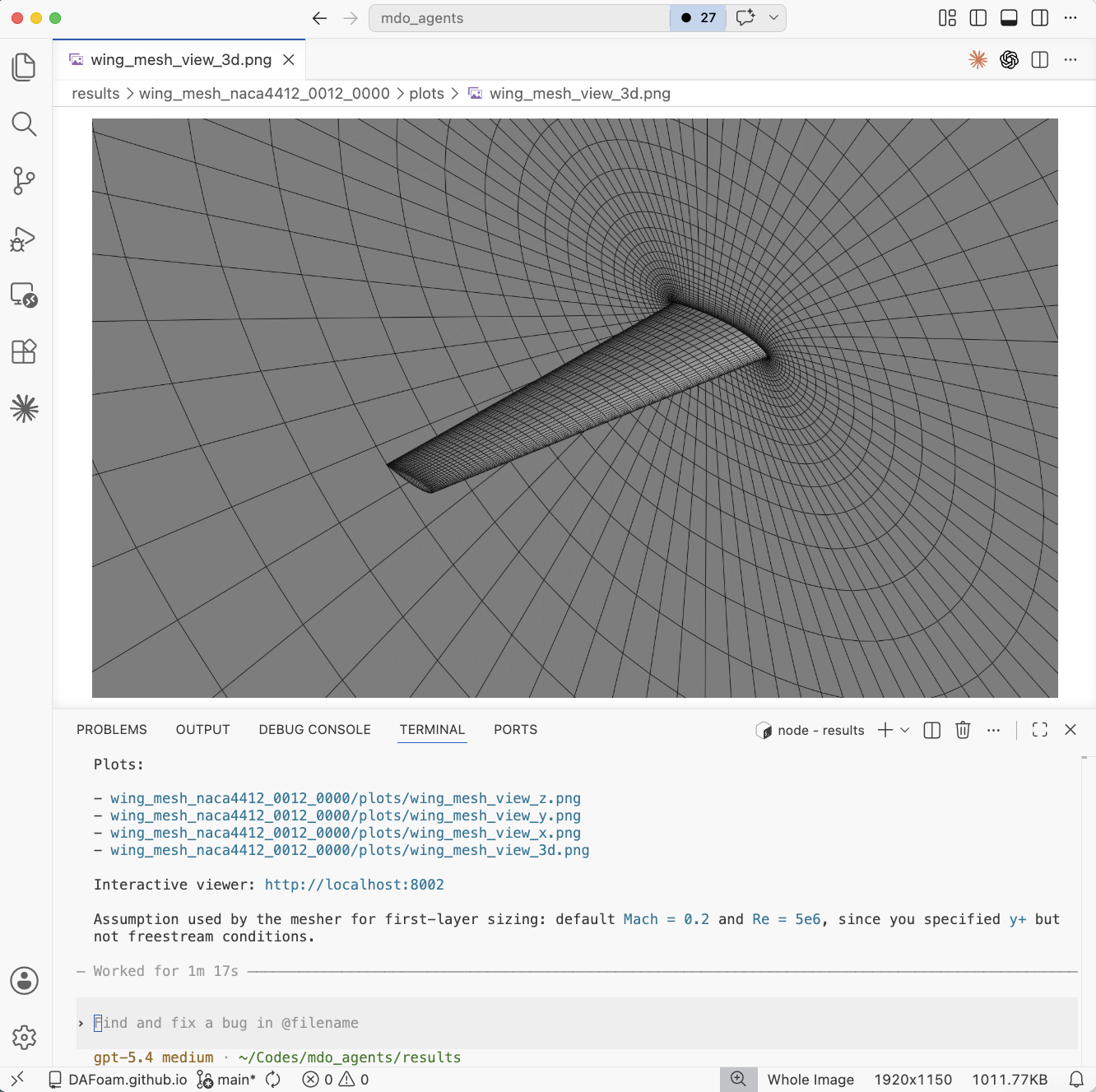
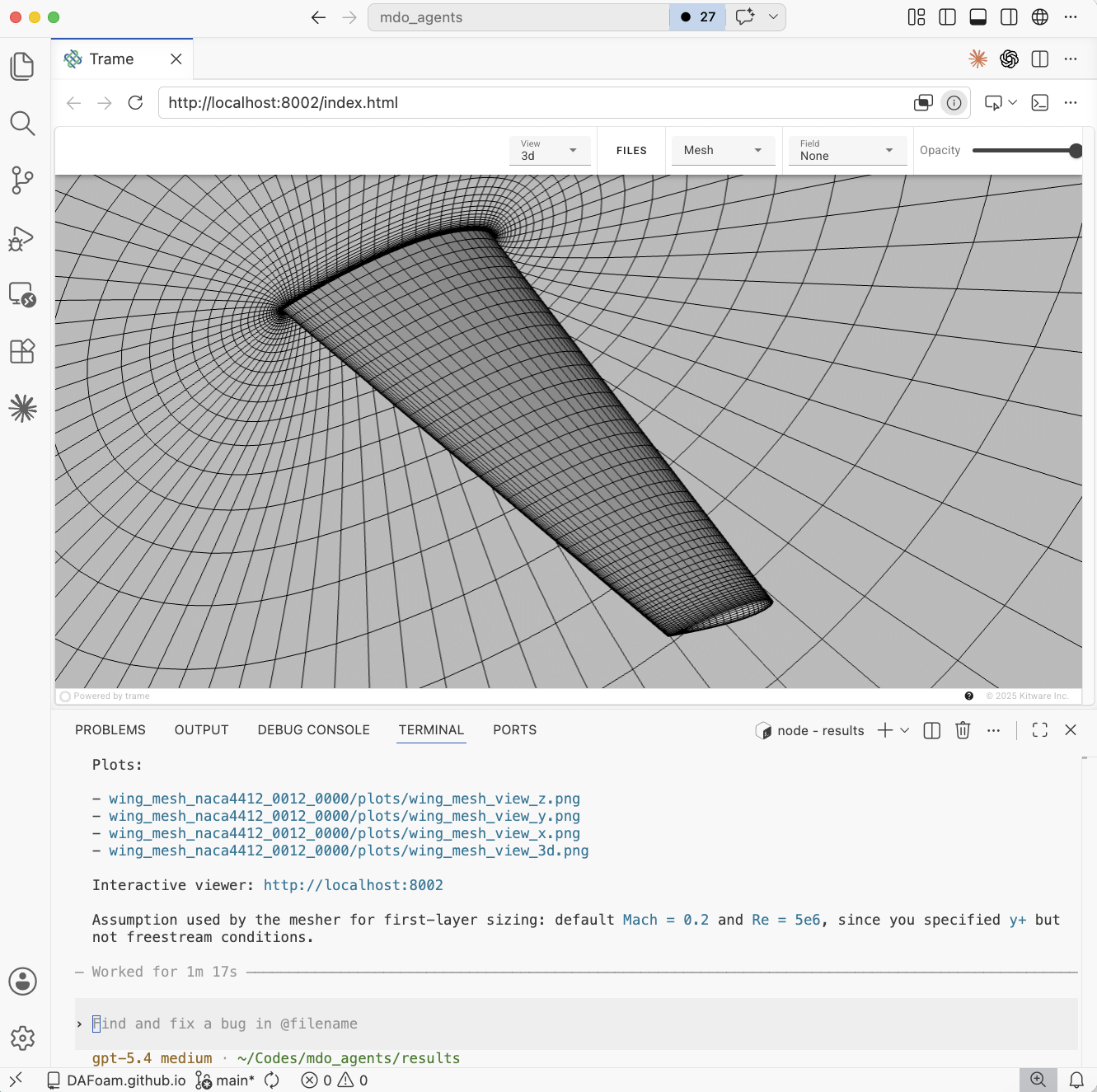
Fig. 1. Left: Overview of the generated CFD mesh. Right: Trame interactive view of the CFD mesh.
CFD-based Aerodynamic Simulation
Users can prompt to run wing CFD simulations with desired Mach number, Reynolds number, and angle of attack. For example,
Generate a cfd mesh for a wing with RAE2822 airfoils. The root chord is 1 m and the tip chord is 0.5 m. The sweep is 15 degs, and the semi span is 4 m. The tip twist is 1 deg. After that, run a cfd with aoa=3degs, The ref mach is 0.8 and the ref re is 1e7.
The following is the AI generated pictures.
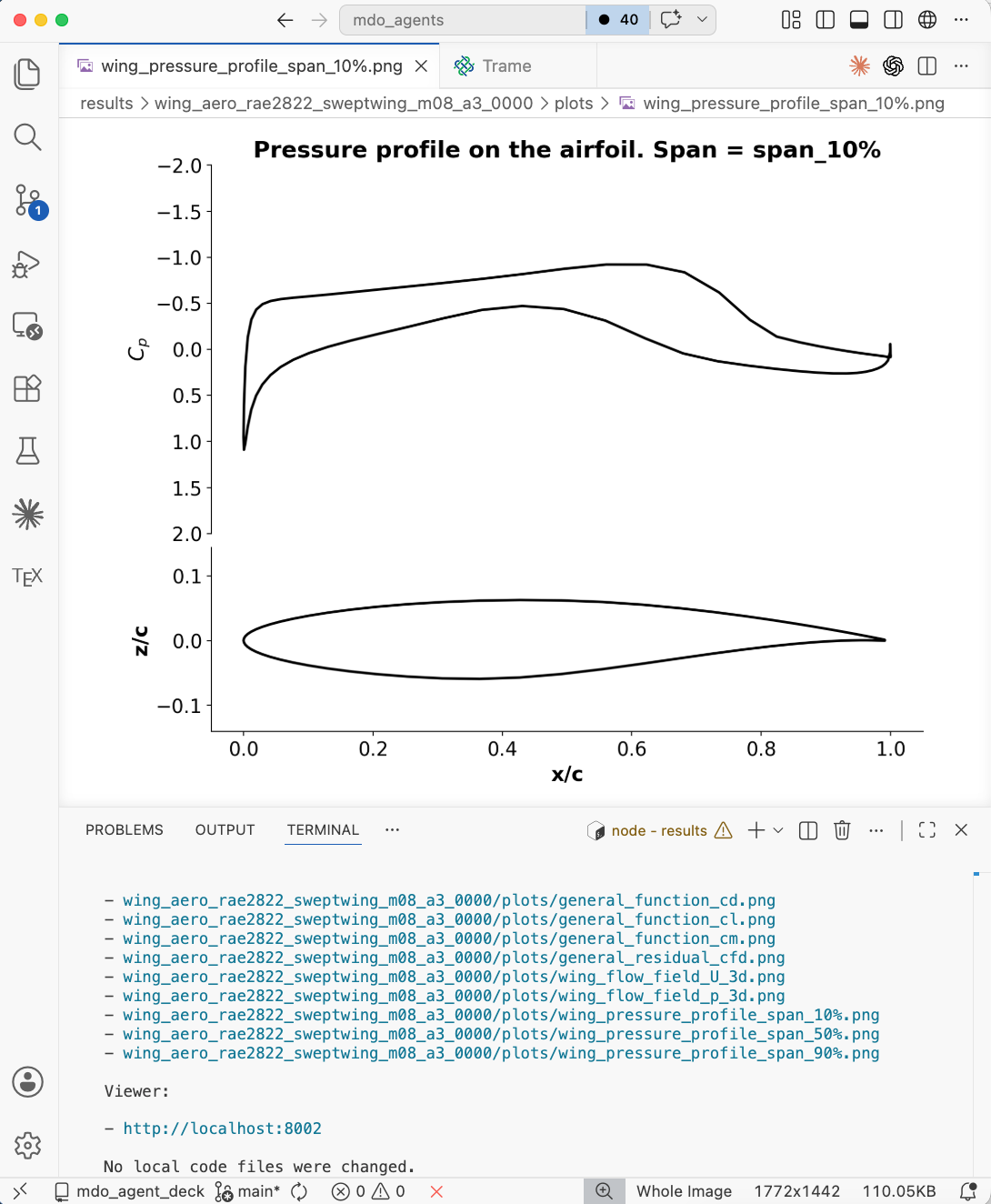
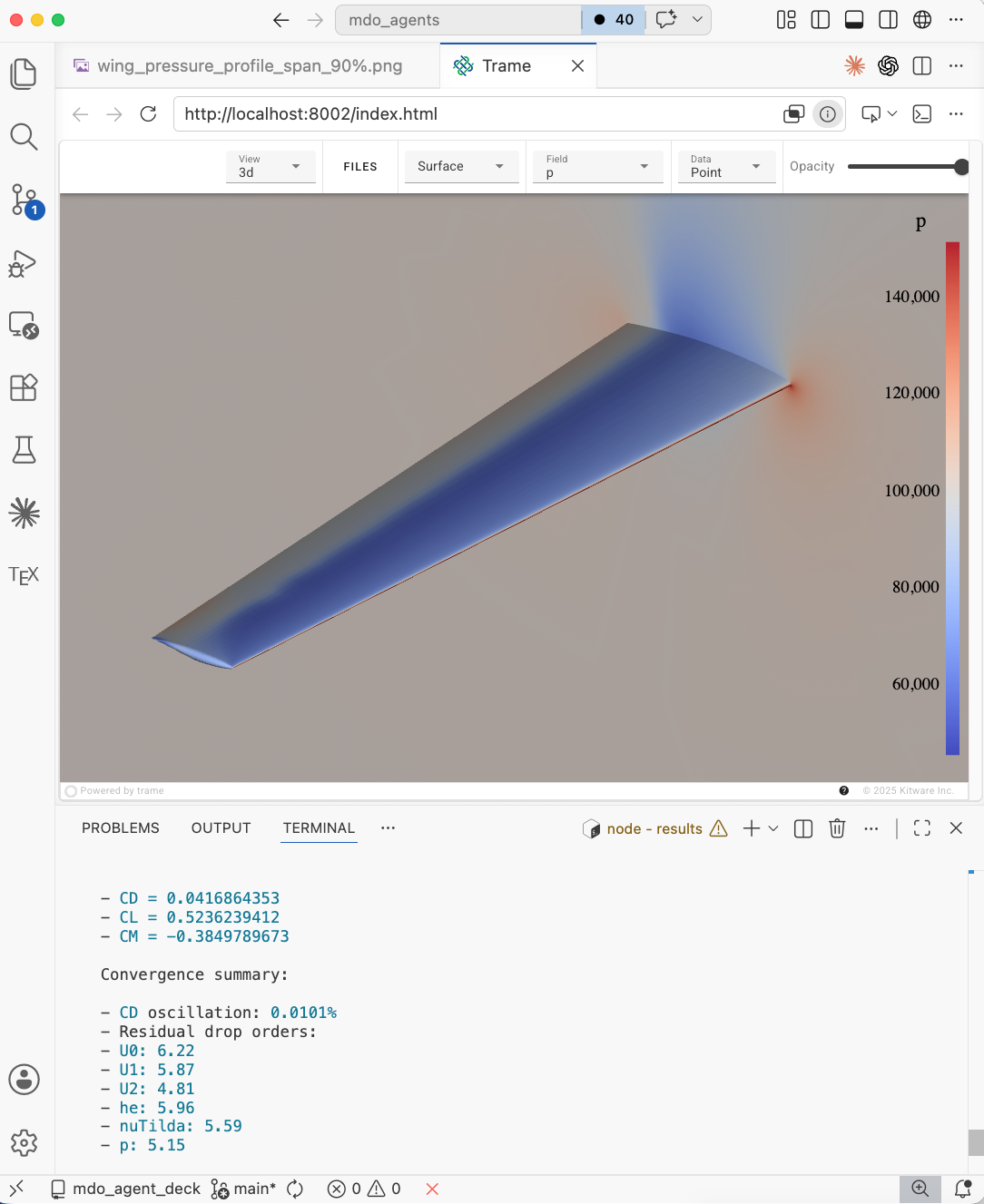
Fig. 2. Left: Pressure profile from the CFD simulation. Right: Trame interactive view of the pressure contour.
FEA Mesh Generation
Users can prompt to generate wing FEA mesh with desired ribs, spars, and the coverage of the wingbox in chordwise and spanwise direction. For example,
Generate a cfd mesh for a wing with naca4412 at the root and naca0012 at the tip. The root chord is 1 m and the tip chord is 0.5 m. The tip twist is 1 deg. The semi-span is 3 m. The sweep is 10 degs. Mesh size 200K, yPlus 50. Also generate a FEA mesh for this wing with 2 spars and 10 ribs. The total element is about 3000. The wingbox starts and ends from 20% to 80% chord and extends to 90% span.
The following is the AI generated pictures.
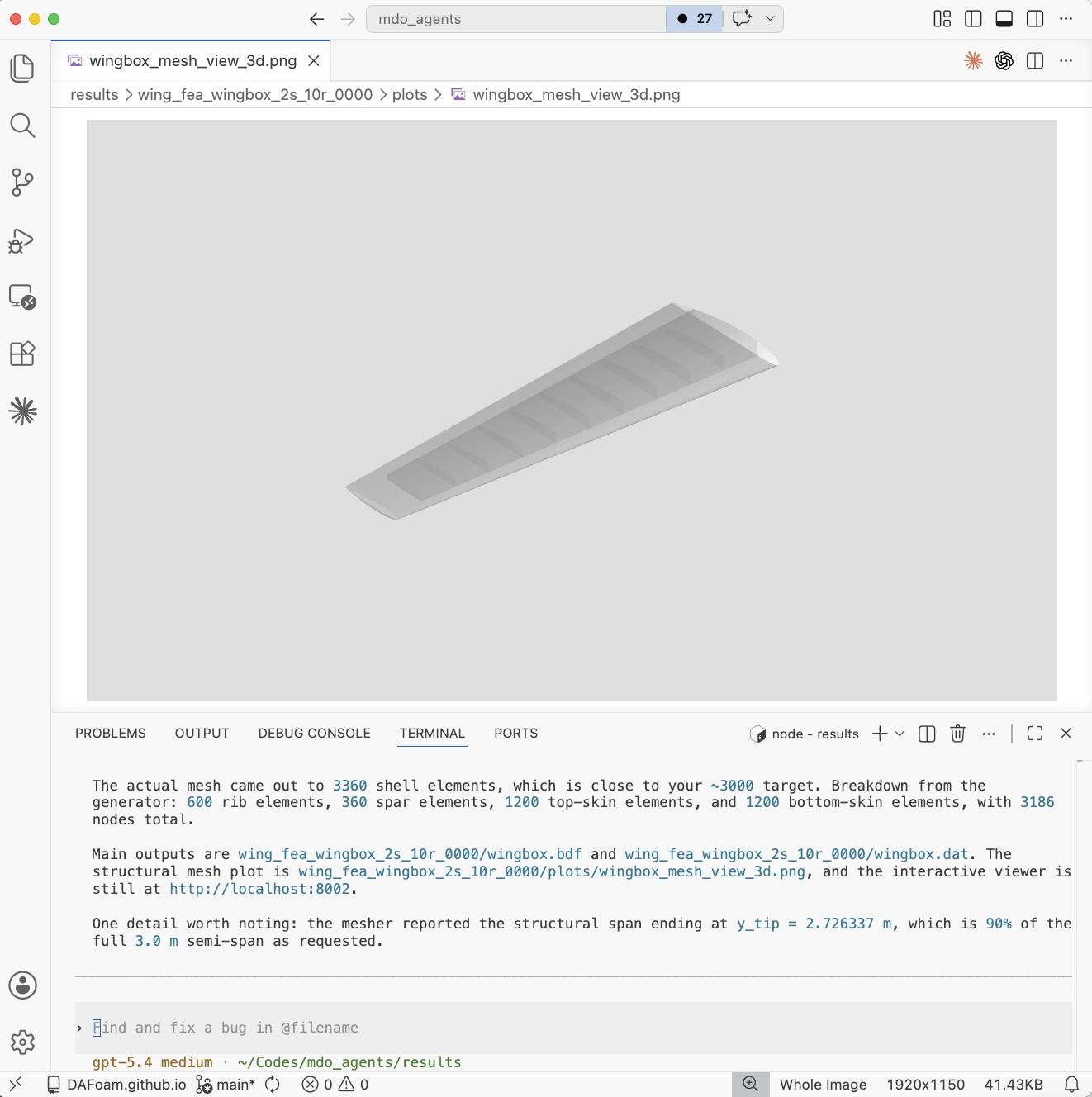
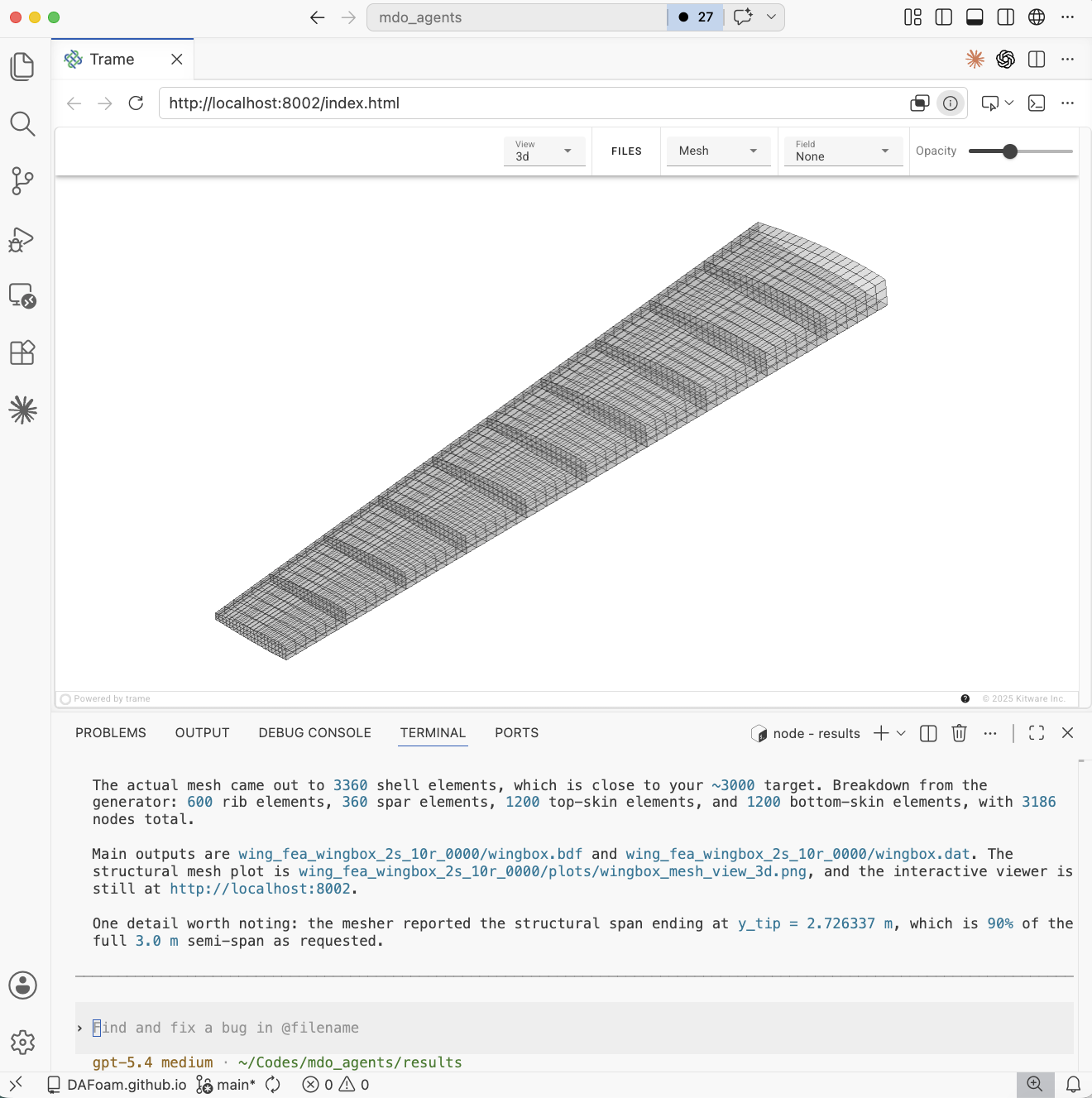
Fig. 3. Left: Overview of the generated FEA mesh. Right: Trame interactive view of the FEA mesh.
CFD+FEA-based Aero-structural Simulation
Users can prompt to run wing aero-structural simulations with desired Mach number, Reynolds number, and angle of attack. For example, you can follow the above FEA mesh generation chat session and ask
Run an aero-structural simulation for this wing with aoa=4 degs, ma 0.3, re 5e6. Use 4 cores
The following is the AI generated pictures.
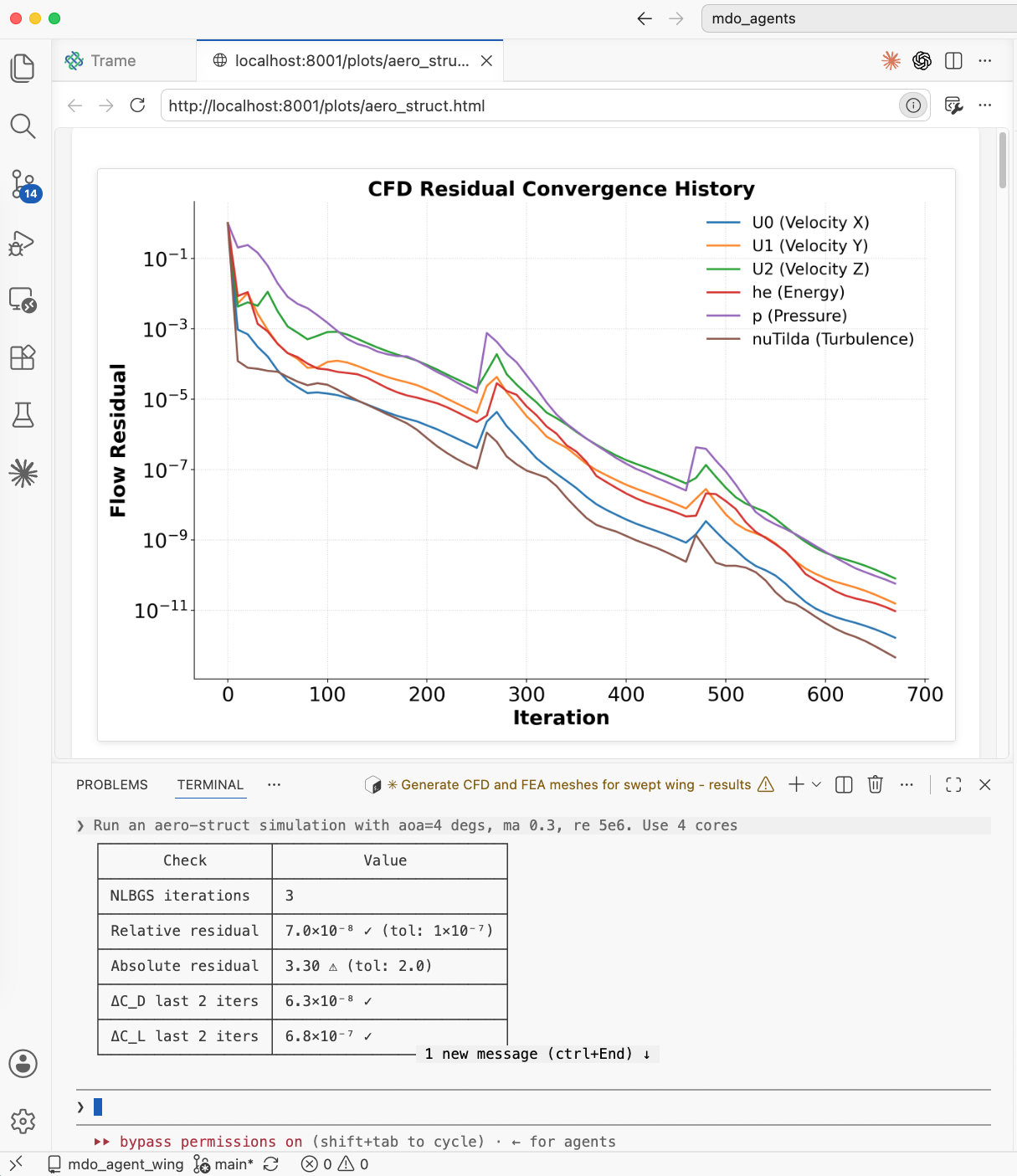
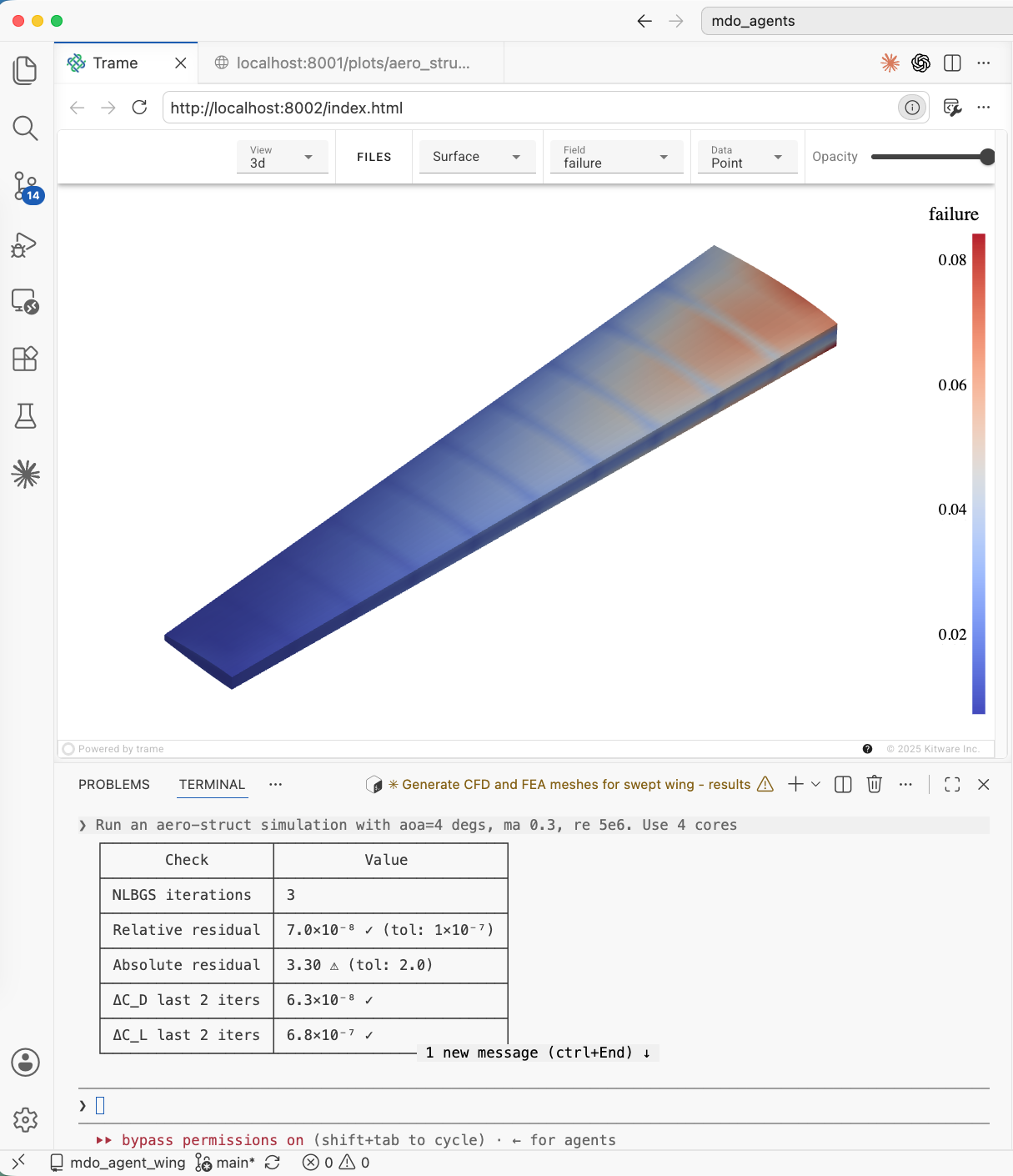
Fig. 4. Left: Flow residual of the aero-structural coupled simulation. Right: Trame interactive view of the von-Mises stress of the wing box.
Aerodynamic Shape Optimization
Users can prompt to run wing aerodynamic shape optimization with desired Mach number, Reynolds number, and target lift constraint. For example,
Generate a CFD mesh for the wing with 100K cells. Then, run an aerodynamic optimization with Ma=0.3, Re=5e6, and CL=0.3. Run for 50 iterations. Use 48 cores.
The case ran on the HPC. After it is finished, you need to resume the chat and ask it to analyze the optimization. The following is the AI generated pictures.
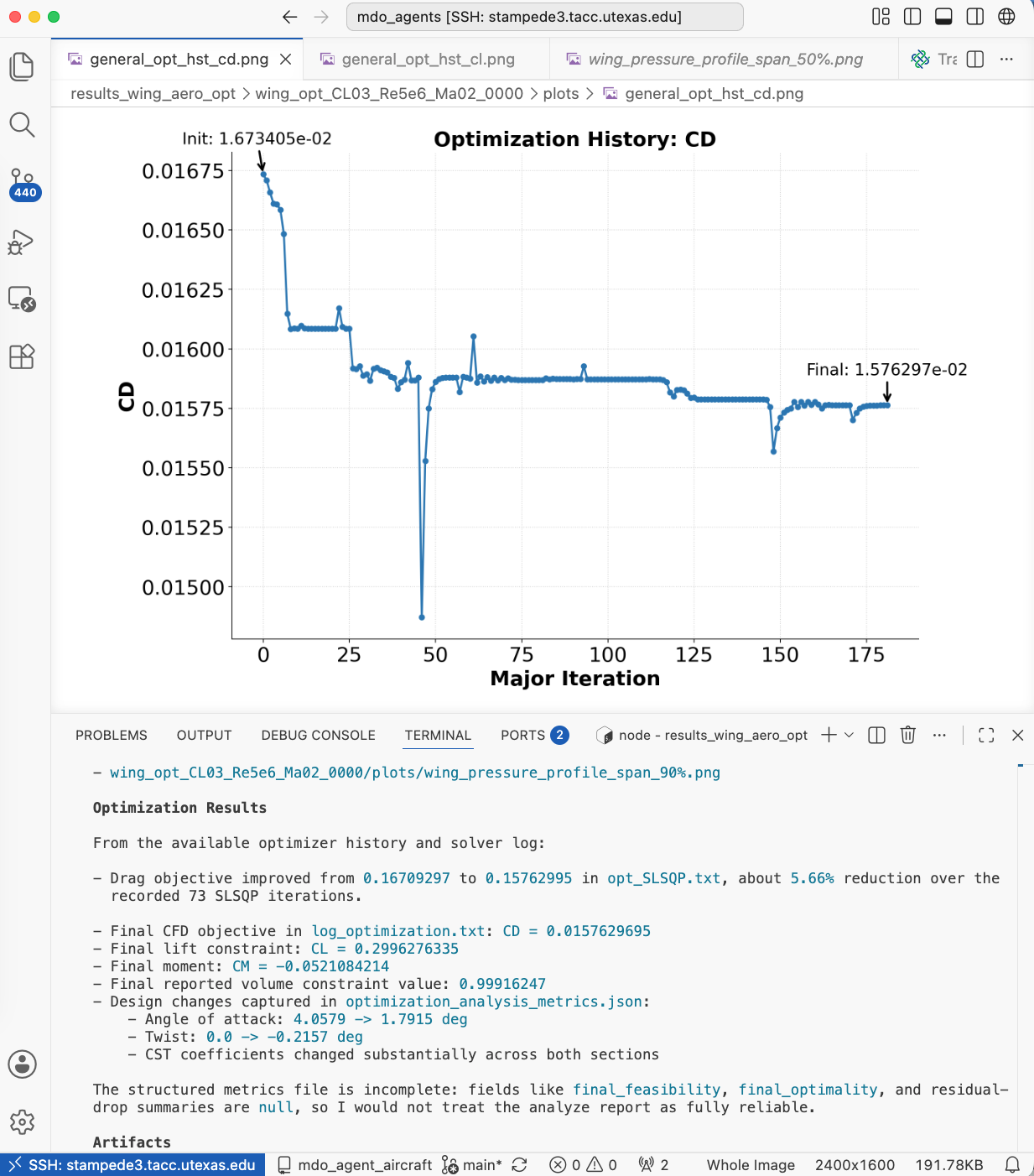
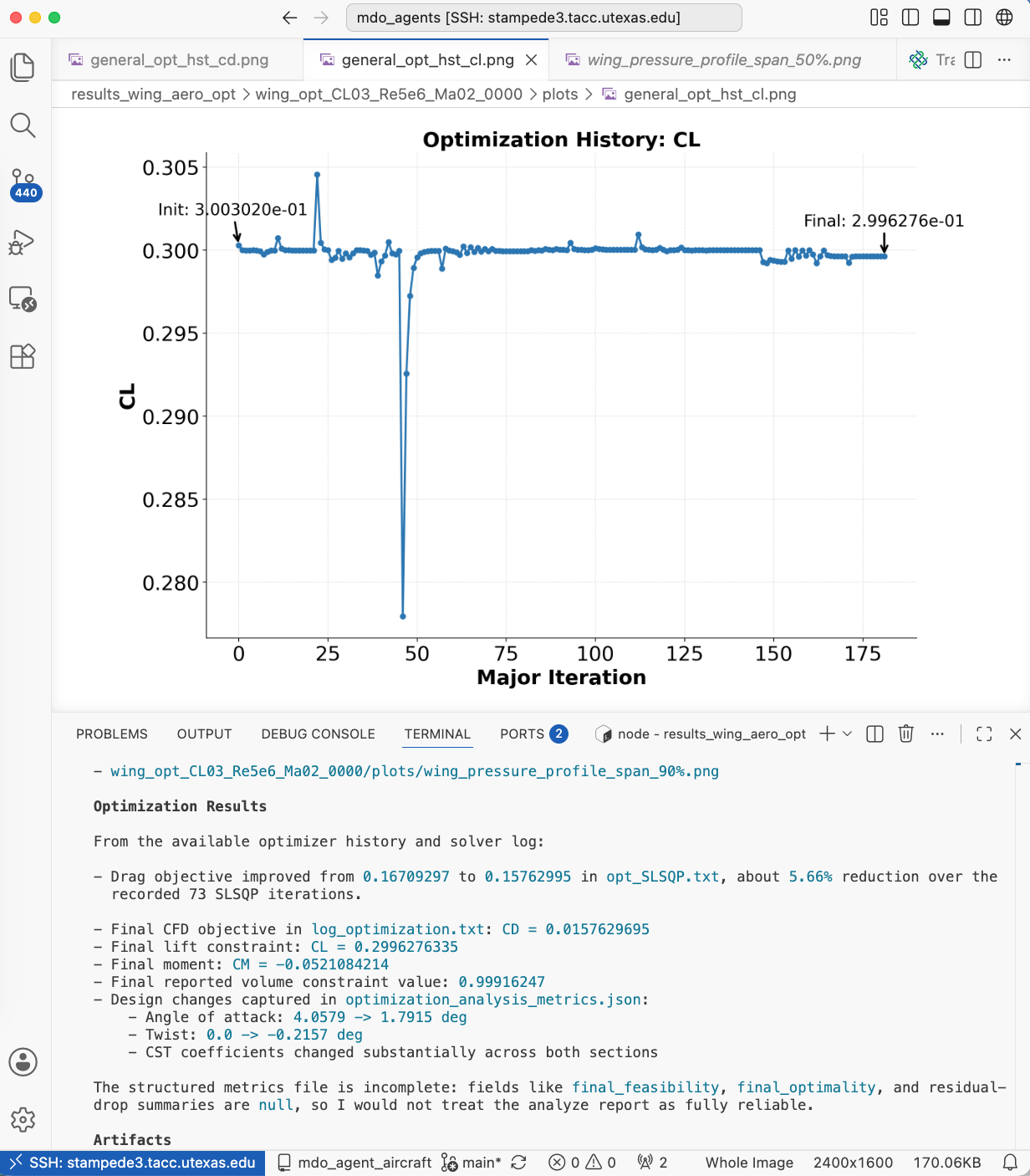
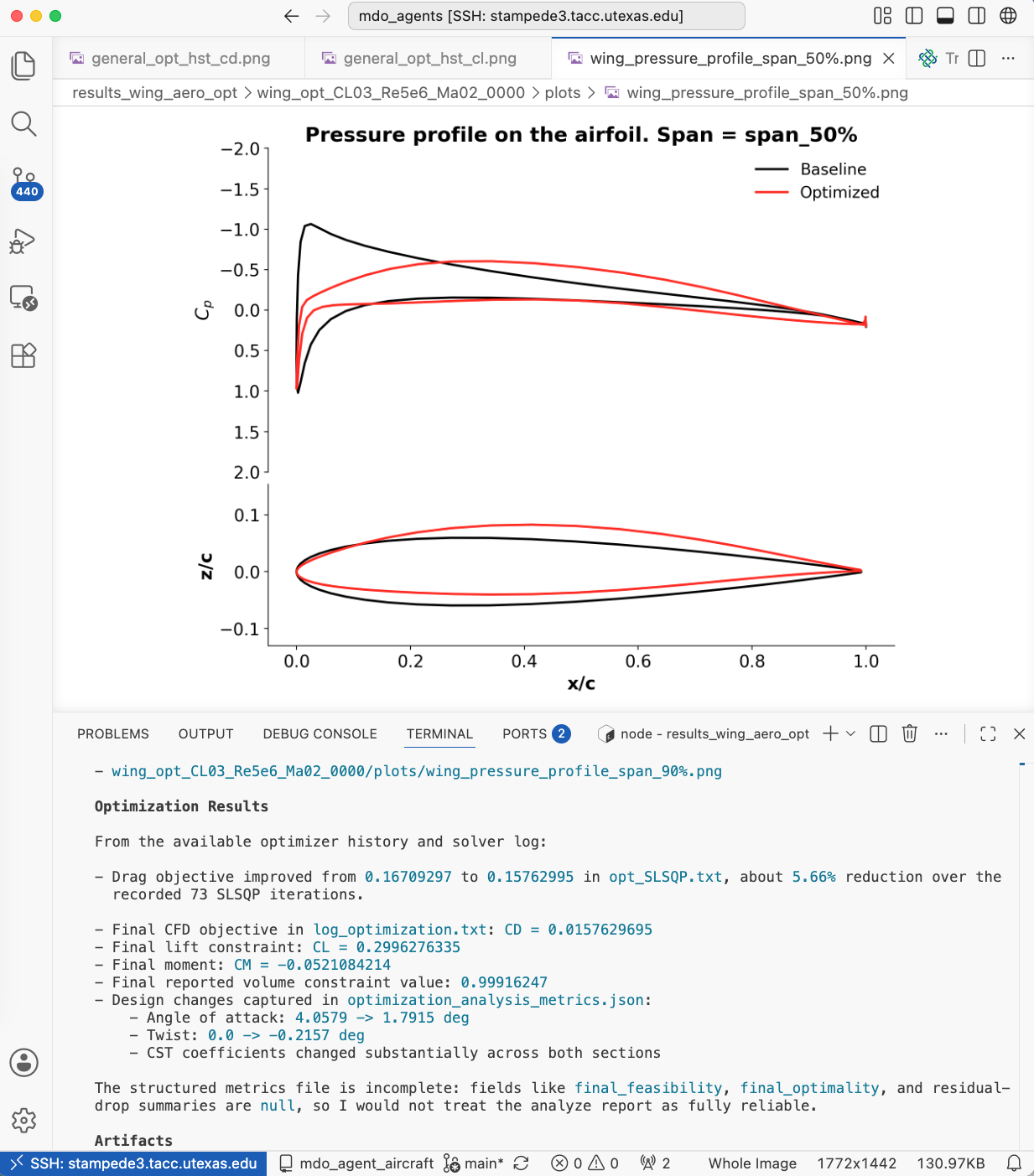
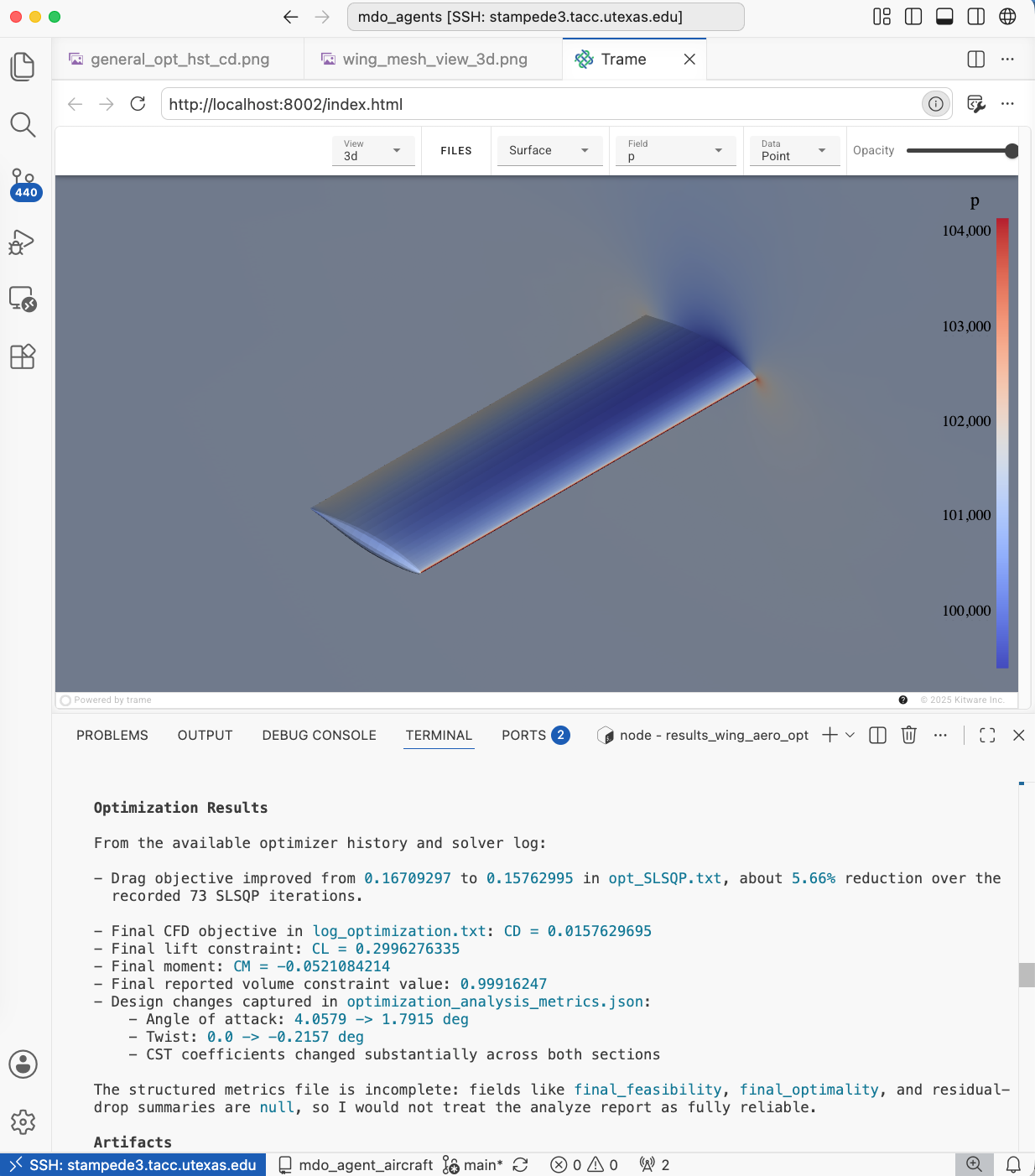
Fig. 5. Top: Optimization convergence history for CD and CL. Bot left: pressure profiles. Bot right: trame server view.